AI Agent Use Cases for Small Business: Practical Examples That Actually Work
For a small business, an AI agent is like hiring a tireless assistant for routine work — triaging emails, qualifying leads, chasing invoices, drafting content. This guide covers the highest-value use cases by department, with real examples and a simple rule for making them work: keep the scope narrow.
Why AI Agents Fit Small Businesses So Well
Small teams wear many hats, and a huge share of the day goes to repetitive, rule-based work — sorting messages, updating records, answering the same questions. That's exactly what AI agents are good at. By handing routine steps to an agent and keeping humans on judgment and relationships, a small business can free up meaningful time each week without hiring. If you're new to the concept, start with what are AI agents?
One consistent lesson from real deployments: the successful ones keep a narrow scope with clear boundaries. An agent that does one job well beats an ambitious one that tries to do everything.
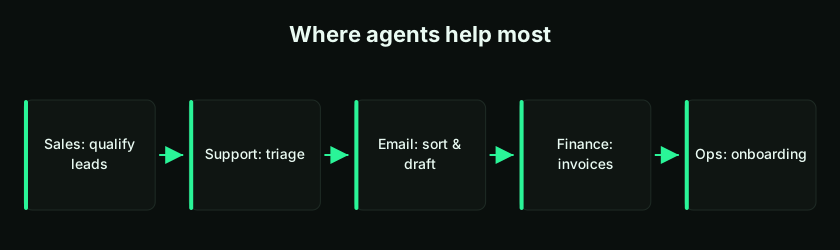
The Highest-Value Areas by Department
| Department | What an agent can handle |
|---|---|
| Sales | Lead qualification, personalized outreach, keeping the CRM updated, scheduling calls |
| Customer support | Answering common questions, checking order status, triaging and routing tickets |
| Marketing | Drafting content, social posts, audience segmentation, campaign follow-ups |
| Finance | Invoice processing, expense checks, vendor comparison, payment reminders |
| HR & operations | Onboarding steps, document approvals, internal workflow reminders |
Sales: Qualify and Route Leads
An agent can watch for new leads, check them against your criteria, enrich them with public information, and assign the best ones to the right salesperson — keeping CRM records current the whole time. It can also send first-touch follow-ups and schedule calls, so your team spends its energy on building relationships and closing rather than data entry. A natural companion here is a CRM app; see how to build a CRM with AI.
Customer Support: Triage and Answer
A support agent can read incoming messages, categorize them by urgency, answer the simple ones from a knowledge base, and route complex issues to a human. Take a late-order query: the agent can check the order system, confirm delivery status, update the customer, and open a ticket for operations if there's a delay — logging every step. The routine cases get instant handling; the tricky ones reach a person with context already gathered.
Email Management: Sort and Draft
Inbox overload is universal. An email agent can automatically categorize inbound messages, draft replies to common ones, and route each to the right team member — without manual sorting. A safe default is to have it draft rather than send, so a human approves anything going to a customer. That alone can reclaim hours a week.
Marketing: Research and Draft Content
An agent can research a topic, draft an article or a batch of social posts, and prepare them for review — turning a blank page into a solid first draft in minutes. It can also handle segmentation and routine campaign follow-ups. The human role shifts to editing, brand voice, and strategy, which is where your judgment matters most.
Finance: Process and Remind
Finance is full of rule-based steps that agents handle well: reading invoices and entering them, checking expenses against policy, comparing vendor quotes, and sending polite payment reminders. Because money is involved, guardrails are essential — the agent should flag anything unusual and never approve or pay without human sign-off. Pair this with an app like the one in how to build an invoicing app with AI.
HR & Operations: Onboard and Approve
Behind-the-scenes operations benefit too: guiding new hires through onboarding checklists, routing document approvals, and nudging people about pending internal tasks. These workflows are repetitive and easy to define, which makes them reliable early wins. A supporting internal app helps — see how to build an internal tool with AI.
How to Start: One Task, Clear Boundaries
Don't try to automate the whole business at once. Pick a single, high-friction task, define it precisely, connect only the tools it needs, and add a human handoff for anything sensitive. Test it on safe data, run it under supervision, and expand only once it's proven. The full walkthrough is in how to build an AI agent without coding.
A practical way to choose your first agent: list your team's most repetitive weekly tasks, then pick the one that's rule-based, low-risk, and eats the most time. That's your best candidate.
A Word on Safety
Agents are helpful but not perfect — they can be confidently wrong or miss context. For a small business, the stakes are real: a mistaken refund or a wrong customer email costs trust. So keep humans in the loop for money, customer communication, and anything irreversible, and make sure the agent escalates when unsure. More in can you trust AI agents?
Bringing Agents Into Your Apps
Many of these use cases work best when the agent lives inside an app that holds your data. With an idea-to-app platform like LogicMint, you can build the app and embed the agent together, or use the business automation builder for workflow automations. You can also start from ready-made templates and agents on the marketplace instead of building from scratch.
Key takeaways
- AI agents suit small businesses because so much daily work is repetitive and rule-based.
- Highest-value areas: sales, support, email, marketing, finance, and operations.
- The winning pattern is narrow scope with clear boundaries — one task done well.
- Keep humans in the loop for money, customer communication, and anything irreversible.
- Agents work best inside apps that hold your data — build them together or start from marketplace templates.
Frequently Asked Questions
What can AI agents do for a small business?
They handle repetitive, rule-based work across sales (lead qualification), support (triage and answers), email (sorting and drafting), marketing (content and follow-ups), finance (invoices and reminders), and operations (onboarding and approvals).
What's the best first AI agent for a small business?
Pick one repetitive, low-risk, time-consuming task — often email triage or lead qualification. Start narrow, test it, and expand once it's proven.
Do AI agents replace employees?
No. They take routine steps off people's plates so the team can focus on judgment, relationships, and growth. Humans stay in charge of decisions and exceptions.
Are AI agents safe for handling money or customers?
Use guardrails. Let agents draft and flag, but keep human sign-off for payments, refunds, and customer-facing communication, and make the agent escalate anything uncertain.
How much time can an AI agent save?
It varies by task, but well-scoped agents typically reclaim several hours a week per workflow by removing manual sorting, data entry, and repetitive replies.
Do I need to build agents from scratch?
Not necessarily. You can start from ready-made templates and agents on a marketplace, or build one inside an app using a no-code idea-to-app platform.
For small businesses, AI agents turn routine, time-draining work into something that runs quietly in the background — as long as you start narrow, add guardrails, and keep a human in the loop. Pick one high-friction task this week and try it. To build agents into real apps, explore LogicMint, browse the marketplace, or read how to build an AI agent without coding.