How to Build an AI Agent Without Coding: A Step-by-Step Guide
You don't need to be a programmer to build an AI agent. With no-code tools, you describe a goal in plain language, connect the apps you already use, and let the agent handle a routine task. This guide walks through the steps — and the one habit that separates agents that work from agents that don't.
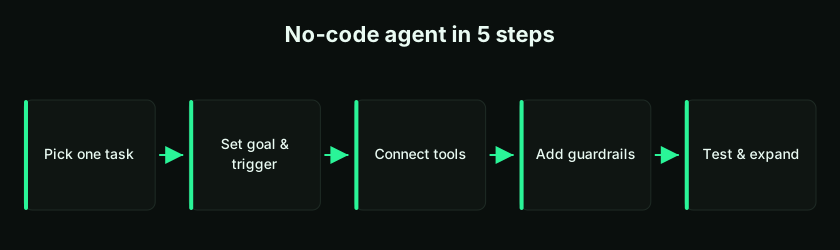
The Golden Rule: Start With One Task
The most common reason people fail at AI agents is trying to automate everything at once. The fix is simple: start with a single, specific task with clear boundaries. A narrow, well-defined agent is easy to build, easy to test, and easy to trust — and you can always expand later. If you're still fuzzy on what an agent is, read what are AI agents? first.
Step 1: Pick a Task Worth Automating
Choose something repetitive, rule-based, and time-consuming — the kind of work you do the same way every time. Good first candidates include:
- Sorting and tagging incoming emails
- Drafting replies to common customer questions
- Qualifying new leads against simple criteria
- Summarizing documents or meeting notes
- Pulling data from a form into a spreadsheet
Avoid tasks that need heavy human judgment, touch sensitive data, or have expensive consequences if they go wrong — at least until you've built confidence with simpler ones.
Step 2: Write the Goal in Plain Language
State clearly what the agent should achieve, for whom, and what "done" looks like. Vague goals produce vague agents. Compare "handle my emails" with a precise version:
Read new emails in the support inbox. Sort each into Billing, Technical, or General. Draft a reply to General questions using our FAQ. Leave Billing and Technical for a human. Never send a reply automatically — save all drafts for review.
That single paragraph defines the goal, the categories, the action, and — crucially — what the agent must not do. This is the same clarity discipline we describe in how to prompt for better results.
Step 3: Define the Trigger and Inputs
Decide what starts the agent and what information it works with. Triggers are usually one of:
- An event — a new email, a form submission, a new row in a sheet.
- A schedule — every hour, every morning, once a week.
- A manual action — you click a button when you want it to run.
Then specify the inputs: which inbox, which spreadsheet, which fields. The clearer the trigger and inputs, the more predictable the agent's behavior.
Step 4: Connect Your Tools
An agent is only useful if it can reach the apps where your work lives. No-code platforms offer one-click connections to common tools:
- Email (Gmail, Outlook)
- Spreadsheets and databases (Google Sheets, Airtable)
- Chat (Slack, Teams)
- CRMs and support tools
- Other apps via APIs
Connect only the tools this specific agent needs. Fewer connections mean fewer things to go wrong and a smaller surface area to secure.
Step 5: Set Guardrails and a Human Handoff
This step is what makes an agent safe to use. Decide, up front, the limits it must respect and the moments it must stop and ask a person:
- What it may do vs. what it may only draft for review.
- Hard limits — e.g. never issue a refund, never email an external customer without approval, never touch records above a certain value.
- Escalation — anything it's unsure about, or anything sensitive, goes to a human.
A good agent signals uncertainty and hands off rather than guessing. Build the handoff before you build the automation, not after.
Step 6: Test With Safe, Sample Data
Before pointing the agent at real work, run it on sample or copied data and watch what it does. Check: Does it categorize correctly? Are the drafts accurate? Does it escalate the right cases? Does it respect its limits? Fix issues with small, specific adjustments to the instructions — one change at a time — rather than rewriting everything.
Step 7: Launch Small, Then Expand
Start with the agent doing its one task under supervision. Review its output for a while, build confidence, and only then widen its scope — a new category here, an extra step there. Expanding a proven agent gradually is far safer than launching a big, complex one all at once. Think in versions, exactly as you would when building an app.
A Simple Worked Example
Say you want an agent to qualify inbound leads:
- Task: score new leads and route them.
- Goal: "For each new lead from the website form, check company size and budget against our criteria, mark it Hot, Warm, or Cold, and add it to the CRM. Assign Hot leads to a salesperson; leave the rest for weekly review."
- Trigger: a new website form submission.
- Tools: the form, the CRM.
- Guardrails: never email the lead directly; only tag and assign.
- Test: run it on last month's leads and compare with how a human would have scored them.
One task, clear limits, testable output — that's a first agent done right.
Common Mistakes to Avoid
- Automating everything at once instead of one task.
- Vague goals that leave the agent guessing.
- No guardrails — letting it act on sensitive tasks without limits.
- Skipping tests or using real customer data too early.
- No human handoff for uncertain or high-stakes cases.
Avoiding these is 90% of building an agent that actually helps. For the trust side, see can you trust AI agents?
Agents, Apps, and the Marketplace
Agents often live inside apps. With an idea-to-app platform like LogicMint, you can generate a working app and embed an agent to handle a task within it — or use the business automation builder for workflow-style automations. You can also start from ready-made building blocks: browse templates and agents on the marketplace, and if you build great agents yourself, you can sell them there too.
Key takeaways
- Start with one specific task — narrow scope is the recipe that works.
- Write the goal in plain language, including what the agent must not do.
- Define a clear trigger, inputs, and tool connections — only what this agent needs.
- Set guardrails and a human handoff before you build the automation.
- Test on safe data, launch small, and expand a proven agent gradually.
Frequently Asked Questions
Can I really build an AI agent without coding?
Yes. No-code platforms let you build agents through visual interfaces and plain-language instructions, with templates and one-click integrations. A basic agent can often be set up in under an hour.
What should my first AI agent do?
Pick one repetitive, rule-based task — sorting emails, drafting common replies, qualifying leads, or summarizing documents. Start narrow and expand once it's proven.
How do I keep an AI agent safe?
Set clear guardrails and a human handoff before launch: define what it may do versus only draft, add hard limits for sensitive actions, and make it escalate anything uncertain.
What can I connect an AI agent to?
Common connections include email, spreadsheets and databases, chat tools, CRMs, and other apps via APIs. Connect only the tools that specific agent needs.
Why do so many AI agents fail?
The usual reasons are trying to automate everything at once, vague goals, missing guardrails, skipping testing, and no human handoff. Fixing these solves most problems.
Do I need real data to test an agent?
No — and you shouldn't use sensitive real data early. Test with sample or copied data first, verify the agent behaves correctly, then move to real work under supervision.
Building an AI agent without code comes down to discipline: pick one task, write a clear goal, connect the right tools, set guardrails, test safely, and expand gradually. Do that and your first agent will quietly take routine work off your plate. To put agents to work inside real apps, explore LogicMint, browse the marketplace, or see practical ideas in AI agent use cases for small business.