The Effective Cost of Building Working Apps with Idea-to-App Platforms
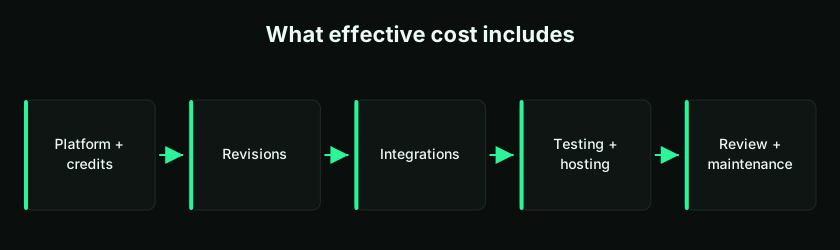
The cost of building apps with idea-to-app platforms is not just the subscription price. The effective cost combines AI credits, revisions, integrations, testing, hosting, professional review, and maintenance — and it's shaped heavily by how disciplined you are. Here's how to plan, avoid waste, and get more from LogicMint.
Beyond the Subscription Price
Earlier, building even a small working application meant developers, designers, planning meetings, wireframes, backend and frontend work, testing, deployment, and revision cycles. With an idea-to-app platform like LogicMint, you describe an idea in plain language and generate the first version far faster. That raises an important question: what is the effective cost of building a working app this way?
The answer is not only the platform subscription. Real cost depends on app size, number of screens and revisions, prompt quality, integrations, testing, hosting, professional review, and — crucially — whether the app is only an MVP or a production-ready application. This guide breaks that down so you can plan better and waste less. (For a broader view, see how much it costs to build an app with AI.)
What "Working App" Actually Means
A working app can perform the core function it was built for — a CRM where you add leads, update status, and view a dashboard; a homework app where teachers post work and parents track completion; an expense app where employees submit and managers approve. These are working apps because the basic workflow works. But a working app is not always a production-ready app — and that distinction changes the cost.
MVP App vs Production-Ready App
| Area | MVP / working app | Production-ready app |
|---|---|---|
| Purpose | Test the idea | Run the real business |
| Users | Founder, team, small test group | Real customers or public users |
| Data | Sample or limited | Real business/customer data |
| Security | Basic | Strong and reviewed |
| Testing | Basic | Proper QA and regression |
| Hosting | Demo or simple deployment | Reliable cloud deployment |
| Backup | Basic or manual | Planned backup and recovery |
| Cost | Lower | Higher |
So before estimating cost, ask: am I building an MVP, or a production-ready app? That one question changes the entire cost picture. (Deep dive: MVP vs production.)
The Main Cost Components
| Cost component | What it means |
|---|---|
| Platform subscription | Monthly or usage-based access to the AI app builder |
| AI credits | Credits consumed generating, improving, or rebuilding features |
| Prompt iterations | Multiple attempts, changes, and refinements |
| Design improvements | UI/UX polishing and layout changes |
| Feature complexity | More screens, roles, logic, and workflows |
| Integrations | Payments, email, WhatsApp, APIs, ERP, CRM, third-party tools |
| Testing | Checking forms, buttons, logic, filters, and workflows |
| Hosting | Server, database, storage, domain, SSL, deployment |
| Professional review | Security, architecture, code quality, production readiness |
| Maintenance | Bug fixes, updates, support, monitoring, improvements |
Many users only think about the first line. The real cost is the full combination — that's the effective cost. See current plans on the pricing page.
Platform Cost Is Only One Part
A fixed monthly or per-app charge is only the visible cost. The hidden cost comes from how the app is built. Two users on the same platform can have very different bills: User A gives clear, small, structured prompts and builds a working MVP with fewer credits; User B gives broad, confusing, repeated rebuild prompts, burns more credits, and still gets a messy result. Cost is not only about the platform — it's about user discipline. A good prompt saves money; a bad prompt burns it.
Why Prompt Quality Affects Cost
A vague prompt creates vague output, which needs more corrections, which consume more credits, which raise cost. "Build a complete business app" tells the platform nothing about the business, users, screens, data, reports, or roles. Compare:
Create a lead-management page for a small-business CRM. The sales executive should add lead name, company, phone, email, lead source, expected value, status, and next follow-up date. Display leads in a table with search, filter by status, and an edit option. Keep the design clean and mobile-responsive.
This reduces guessing, rework, and cost. Our full guide, how to prompt LogicMint for better results, covers this in depth.
Rebuilding Components Increases Cost
Repeated rebuilding is one of the biggest reasons users overspend. If you already have a lead table and only want a filter, don't rebuild the full CRM. Instead of "Rebuild the CRM with filters, lead table, dashboard, and reports," say: "Add a status filter to the existing lead table. Keep the current form, dashboard, and design unchanged." Improving existing components is cheaper and safer than recreating them.
Build Small Modules to Control Cost
The best way to control cost is to build in small modules. For an e-commerce app, build in order — product listing, product details, cart, checkout, order history, admin product management, inventory, coupons, payment integration, analytics — and test after each step to decide whether to continue, improve, or stop. This avoids wasting credits on features you may not need and makes errors easier to fix. (The method: building with small prompts.)
Simple vs Medium vs Complex
| App type | Typical features | Cost impact |
|---|---|---|
| Simple app | 1–3 screens, forms, basic table, simple dashboard | Low |
| Medium app | 4–8 screens, roles, filters, reports, file upload | Medium |
| Complex app | Multiple roles, integrations, payments, workflows, APIs, analytics | High |
| Enterprise app | Multi-tenant, audit logs, compliance, ERP integration, scale | Very high |
A simple internal tracker builds quickly; a SaaS platform with subscriptions, user management, billing, reporting, and API integrations costs far more. The platform reduces the starting cost, but complexity still matters — AI speeds up development, it doesn't remove complexity.
Cost by App Size
Simple working apps — a login flow, one main form, a data table, basic search, one dashboard, mobile-responsive layout (lead tracker, task manager, homework tracker, visitor log) — are the most cost-effective use case; the main drivers are revisions, prompt clarity, UI polish, basic testing, and hosting. Medium apps — multiple roles, several screens, dashboard cards, reports, filters, uploads, approval workflows, notifications (CRM, expense approval, client portal) — cost more because there are more moving parts, each adding development and testing effort. Complex apps — payments, subscriptions, API/ERP integrations, complex workflows, audit logs, analytics, multi-tenant architecture, mobile support (SaaS platforms, marketplaces, LMS) — are expensive not only for coding but for decisions: security, architecture, database, payment, compliance, scaling, and testing decisions where professional review becomes important.
Hidden Costs Users Underestimate
| Hidden cost | Why it matters |
|---|---|
| Rework | Poor prompts or unclear requirements cause repeated changes |
| Scope creep | Adding too many features increases cost |
| Integration issues | External APIs need setup, keys, testing, error handling |
| Data migration | Moving old Excel or system data takes effort |
| Authentication | Proper login, roles, and permissions need careful setup |
| Security | Data protection cannot be ignored |
| Hosting | Deployment, database, SSL, and monitoring |
| Maintenance | Apps need updates after launch |
| Professional review | Serious apps need expert validation |
The cheapest app is not always the best app. The right goal is a useful app at the right cost.
Integration Cost Can Exceed Generation Cost
Generating screens is often quick; integrations take more effort. Payment gateways, email, SMS, WhatsApp, Google/Microsoft login, Sheets, CRM, ERP, accounting software, shipping, calendar booking, and analytics each have their own setup, rules, API limits, authentication, error handling, and testing. Adding a payment gateway isn't just a button — you must handle success, failure, refunds, invoices, taxes, payment status, webhook verification, customer records, subscription renewals, and security. That's why integration-heavy apps cost more. (See adding payments to an AI-generated app.)
Hosting, Deployment, and Maintenance
A working app has to run somewhere: domain, SSL, server or cloud hosting, database, file storage, email, monitoring, backup, error logs, and a deployment pipeline. Simple hosting can suffice for MVP testing; production use needs reliable deployment because downtime becomes a business risk. And cost doesn't end at launch — every app needs maintenance: bug fixes, security updates, feature changes, performance tuning, database cleanup, backup checks, API updates, and support. Third-party services change over time (a payment provider updates its API; an email provider changes limits), so plan for ongoing upkeep. A working app is not a one-time object — it's a living system.
How LogicMint Reduces Effective Cost
LogicMint lowers effective cost by helping you generate the first version faster, avoid starting from a blank screen, build MVPs without heavy upfront cost, use plain language instead of technical specs, break apps into modules, improve existing components, test ideas before hiring full teams, clarify requirements before production development, and create stakeholder demos. In short, it reduces the cost of reaching clarity — and in software, clarity itself saves money. A clear MVP can prevent expensive mistakes later.
How to Reduce Cost While Using LogicMint
- Start with a small MVP — build only the core workflow first.
- Use clear prompts — name the exact page, fields, actions, roles, and expected output.
- Avoid full rebuilds — improve existing components instead of recreating everything.
- Test after every step — don't keep adding features without testing.
- Add integrations later — make the core app work first.
- Separate MVP and production goals — don't expect a prototype to behave like an enterprise app.
- Use professional help when needed — for security, payments, compliance, and deployment, review saves future cost.
Cost Planning Examples
CRM. The MVP (lead form, table, status, follow-up date, dashboard, search/filter) is cost-effective in LogicMint. An improved version (roles, lead assignment, email reminders, Excel import, exports, manager dashboard) costs more for the added logic. The production version (secure auth, role-based permissions, API integrations, audit logs, backup, cloud deployment, performance optimization, team access, professional testing) needs review — higher cost, but suitable for real business.
E-commerce. The MVP (listing, details, cart, checkout, order list, admin management) is low-cost for testing. Production adds payments, tax, inventory sync, shipping, refunds, account security, emails, coupons, analytics, legal pages, performance, and mobile testing — higher cost because real business risk is involved. (See building an e-commerce store with AI.)
Finance approval. The MVP (expense form, receipt upload, manager approval, status tracking, basic report) validates the workflow cheaply. Production may require an approval matrix, department budgets, tax classification, ERP integration, audit trail, maker-checker controls, role permissions, secure document storage, accounting export, monthly reports, and backup/retention — higher cost because accuracy and control matter.
Why the Cheapest Build Can Get Expensive
A very cheap build looks attractive at first, but a badly structured app becomes expensive later — poor database design, messy workflows, weak permissions, no error handling, no audit trail, no backup, bad mobile experience, hard-to-maintain code. When that happens, the app may need major rework; sometimes rebuilding from scratch is cheaper than fixing a mess. So the goal isn't lowest initial cost — it's effective cost: the right result at the right stage with minimum waste.
The Real Value: Faster Validation
The biggest value of idea-to-app platforms isn't just cheaper generation — it's faster validation. You can test whether the idea makes sense, whether users like the workflow, whether it solves a real problem, whether the screens are clear, and whether customers will pay. That can save a large amount of money: instead of spending heavily on a full application and later discovering users don't need it, you build an MVP first. That's the smart financial decision.
The Effective Cost Formula
A simple way to think about it:
Effective Cost = Platform Cost + Credits Used + Revisions + Integrations + Testing + Hosting + Professional Review + Maintenance
But there's a hidden multiplier — poor-clarity cost. Poor clarity increases revisions, rebuilds, testing issues, and professional cleanup. So the honest formula is:
Effective Cost = Direct Cost + Rework Cost + Production-Readiness Cost
How to Avoid Burning Money
Build one module at a time. Use clear prompts. Improve existing components. Don't rebuild unless required. Test before adding features. Skip unnecessary advanced features in the MVP. Add integrations only when the workflow is stable. Use sample data during early testing. Document your requirements. And get professional review before production use. These simple steps save real money.
Key takeaways
- The effective cost is subscription + credits + revisions + integrations + testing + hosting + review + maintenance — not just the plan price.
- Prompt clarity and avoiding full rebuilds are the biggest levers you control.
- Integrations and production readiness often cost more than app generation itself.
- Build small modules, test each step, and add integrations only once the core works.
- The cheapest build can become the most expensive — aim for effective cost, not lowest cost.
Frequently Asked Questions
What is the cost of building an app with an idea-to-app platform?
The cost depends on app complexity, number of screens, credits used, revisions, integrations, testing, hosting, and whether the app is only an MVP or production-ready.
Is an AI app builder cheaper than hiring developers?
For MVPs and prototypes, an AI app builder can be more cost-effective because it generates the first version quickly. For production-ready apps, professional development or review is still recommended.
Why do some users spend more credits than expected?
Users often spend more because of vague prompts, repeated full rebuilds, unclear requirements, too many features, and insufficient testing between changes.
How can I reduce the cost of building apps with LogicMint?
Use small prompts, build one module at a time, improve existing components, avoid unnecessary rebuilds, test after every step, and add integrations only after the core workflow works.
Is a working app the same as a production-ready app?
No. A working app may perform the basic workflow. A production-ready app needs security, scalability, testing, deployment, backup, monitoring, and maintenance.
What type of apps are most cost-effective to build?
Simple and medium MVPs are usually the most cost-effective — CRM dashboards, task trackers, booking apps, expense-approval flows, school homework apps, and internal tools.
Do integrations increase app cost?
Yes. Integrations with payment gateways, email, WhatsApp, ERP, CRM, analytics, or third-party APIs increase cost because they require setup, testing, security, and error handling.
Should I use professional services after building an MVP?
Yes, if the app will be used commercially, internally with real users, or with real customer data. Professional review helps make the app secure, scalable, and production-ready.
Can LogicMint help reduce development cost?
Yes. LogicMint reduces early-stage cost by letting users generate MVPs, test ideas, improve workflows, and clarify requirements before investing in full production development.
What is the smartest way to build cost-effectively with AI?
Start small, build the core MVP, use clear prompts, avoid full rebuilds, test continuously, and move to professional production development only when the idea is validated.
The effective cost of building a working app with an idea-to-app platform is far more than the subscription price — it includes credits, revisions, integrations, testing, hosting, professional review, and maintenance. LogicMint reduces early-stage cost by making it easy to generate MVPs, test ideas, and avoid starting from zero, but you must build wisely: clear prompts reduce cost, small modules reduce waste, testing reduces rework, and professional review reduces production risk. Use LogicMint to build and validate cost-effectively, then move to professional development when you're ready for real users, real data, or a commercial launch. Start from LogicMint or compare plans on pricing.