How to Prompt LogicMint for Better Results Without Rebuilding Components and Burning Credits
AI app builders are powerful, but they need clear instructions. Learn how to prompt LogicMint to improve existing components, avoid unnecessary full rebuilds, and reduce wasted credits — so you build faster, cleaner apps at lower cost.
Why How You Prompt Decides Your Cost
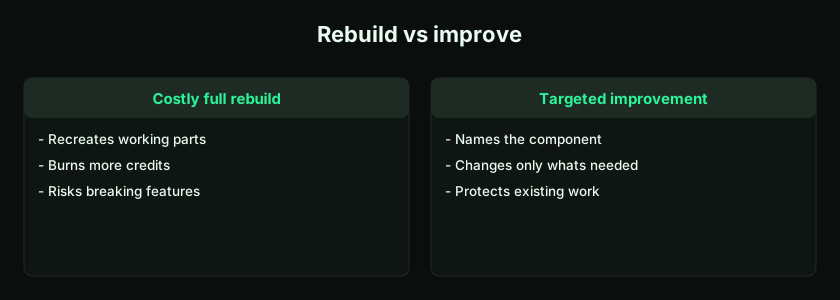
Used well, LogicMint lets you build apps faster, improve features step by step, and keep costs low. Used poorly — with vague prompts, oversized prompts, or repeated rebuild instructions — you waste time, credits, and effort. The most common and expensive mistake is asking LogicMint to rebuild the entire app or page again and again when only one small improvement is needed.
Instead of "Add a date filter to the existing lead table," some users say "Rebuild the full CRM app with lead management, dashboard, filters, reports, and user roles." That burns more credits, takes longer, and can disturb components that already worked. The smarter rule is simple: improve what already exists; don't rebuild everything unless a rebuild is genuinely required. This is the natural next step after learning to build with small prompts.
Why Prompt Quality Matters
LogicMint works from your instructions. A clear prompt usually produces a better result; a vague prompt produces broad, generic, or incomplete output. Think of it as a very fast development assistant that needs direction. A weak prompt says "Make this better." A strong prompt says:
Improve the existing customer dashboard by adding summary cards for total customers, active customers, inactive customers, and new customers this month. Do not change the existing table or navigation.
The strong version states what to improve, where, what to add, and what not to change. That specificity saves credits and protects existing work — the same clarity that helps whether you're building a full app or a single AI agent.
The Biggest Mistake: Repeated Full Rebuilds
When users dislike one part of an app, they sometimes regenerate the whole thing — rarely the best approach. Suppose you already have a CRM with a lead form, lead table, follow-up dashboard, sales summary cards, and search/filter, and you only want to add a "Lead Source" field. A bad prompt is "Rebuild the CRM app with lead management, lead source, dashboard, follow-ups, and reports," which may recreate working components unnecessarily. A better prompt:
Add a new field called Lead Source to the existing lead-creation form and lead table. Keep all existing CRM features unchanged.
It changes only what's required — which is how you avoid burning credits.
Improve Existing Components Instead of Recreating Them
Use phrasing that signals improvement, not reconstruction: "Update the existing page," "Modify the current component," "Add to the existing form," "Keep the current design unchanged," "Do not rebuild the full app," "Only change this section," "Preserve all existing features." For example:
Update the existing expense-approval dashboard by adding a filter for department and status. Keep the existing approval table, buttons, and layout unchanged.
That improves the app. "Create an expense approval app," by contrast, may restart it from scratch.
Use Small Prompts for Small Changes
A small change deserves a small prompt. Need one button, field, filter, or dashboard card? Ask for exactly that. Don't mix ten unrelated changes into one instruction like "Add filters, improve design, add export, add roles, add email, add notifications, fix mobile, add reports, and change the dashboard." Break it up:
- "Add filters for status and date range to the existing order table."
- "Add an Export to Excel button for the filtered order list."
- "Improve the mobile layout of the order table without changing the desktop design."
- "Add summary cards above the table: total, pending, completed, and cancelled orders."
This step-by-step method gives better control and less rework.
Always Name the Existing Component
When improving an app, name the exact component you want changed. Instead of "Add search," say: "Add a search bar to the existing customer-list table. The search should work on customer name, email, and phone number." Instead of "Add status," say: "Add a status dropdown to the existing lead-creation form with options New, Contacted, Qualified, Won, and Lost. Show the selected status as a badge in the existing lead table." Specificity saves credits.
Tell LogicMint What Not to Change
This is essential. When improving an app, protect the parts that already work with explicit guardrails: "Do not change the existing login flow," "Do not remove existing fields," "Do not change the database structure unless required," "Do not modify the navigation menu," "Keep the existing design style," "Preserve all current functionality." For example:
Add a due-date filter to the existing homework table. Do not change the homework-creation form, parent dashboard, or existing status logic.
That clearly limits the scope and prevents accidental changes.
The Five-Part Prompt Structure
| Part | What to write |
|---|---|
| Target | Which page, module, or component to change |
| Action | What exactly should be added, improved, fixed, or removed |
| Details | Fields, buttons, filters, roles, labels, logic |
| Protection | What should remain unchanged |
| Design | Whether to keep or improve the design |
Put together: "Update the existing [page/component] by adding [feature]. It should [behavior]. Keep [existing parts] unchanged. Maintain the current design style unless needed." For example:
Update the existing lead-management page by adding a Lead Source dropdown with options Website, Referral, LinkedIn, Email Campaign, and Walk-in. Show Lead Source in the existing lead table. Keep the current lead form, status logic, filters, and dashboard unchanged.
Good Prompt Examples
- Add a field: "Add a Priority field to the existing task-creation form with options Low, Medium, and High. Show Priority as a colored badge in the existing task table. Do not change any other fields or layout."
- Add a filter: "Add a status filter to the existing customer table for All, Active, Inactive, and Pending. Keep the columns unchanged."
- Improve mobile: "Improve the mobile layout of the existing product-listing page: show products as cards instead of a table on mobile. Keep the desktop layout unchanged."
- Add dashboard cards: "Add four summary cards to the top of the existing sales dashboard: Total Leads, Open Leads, Won Deals, Lost Deals. Do not change the existing chart or lead table."
- Fix a bug: "The due-date filter on the homework table is wrong. Fix it to filter by Today, This Week, Overdue, and Custom Date Range. Do not change the creation form."
- Add a permission: "Update the role logic so teachers can create and edit homework, parents can only view their child's homework, and admins can view all homework. Do not change the UI design."
Bad Prompts That Waste Credits
Avoid broad, open-ended instructions like "Rebuild everything properly," "Make the app professional," "Fix all issues," "Create the app again," "Add all missing features," "Make it like Salesforce," "Make it like Amazon," or "Build a full ERP." They ask the platform to perform a huge task, consuming more credits and often creating unwanted changes. Because prompt discipline is one of the biggest levers on your bill, this ties directly into the effective cost of building apps. Break the requirement into smaller, specific prompts instead.
Better Alternatives to Bad Prompts
| Bad prompt | Better prompt |
|---|---|
| Make it better | Improve the existing dashboard spacing, button alignment, and card layout without changing functionality |
| Rebuild the app | Fix only the customer-table sorting issue and keep the rest unchanged |
| Add reports | Add a monthly sales report showing total leads, won deals, lost deals, and expected revenue |
| Add roles | Add Admin and User roles. Admin can view all records; User can view only their own |
| Fix design | Improve the login-page design with better spacing, larger inputs, and a clearer submit button |
| Add everything | Add only the payment-status field to the invoice table for now |
Think in Versions
Build in versions rather than trying to reach "version 10" in one prompt. Version 1 is the core feature; version 2 adds filters; version 3 adds dashboard cards; version 4 adds roles; version 5 adds notifications; version 6 adds reports. For a CRM:
- V1: "Create a basic lead-capture form and lead-list table."
- V2: "Add lead status and filters to the existing lead list."
- V3: "Add a sales dashboard using the existing lead data."
- V4: "Add manager and sales-executive roles."
- V5: "Add follow-up reminders."
Controlled development like this also keeps credit usage predictable.
Fix Before Adding More
Don't add new features on top of broken ones. If a button doesn't work, fix it before adding a dashboard; if the table shows wrong data, fix it before adding reports; if login fails, fix it before adding roles. Use targeted prompts:
Before adding new features, fix the existing form-submission issue. The form should save name, email, phone, and status correctly and display the record in the table.
Stable apps cost less to improve; messy apps cost more to repair.
Ask Before You Rebuild
If you're unsure whether a change needs a rebuild or just an edit, ask LogicMint first: "Review the current app structure and tell me whether adding role-based access requires updating existing components or rebuilding any page. Do not make changes yet." Sometimes a small edit is enough; sometimes deeper changes are needed. Checking before you spend avoids costly rebuilds.
A Prompt Checklist
Before submitting a prompt, confirm: Is my request specific? Did I name the exact page or component? Did I say what to add or change? Did I say what should not change? Did I avoid asking for too many things at once? Did I explain the expected behavior? Did I mention mobile or design needs? Did I ask for an improvement rather than a rebuild where possible? If yes to these, your prompt is likely a good one.
Key takeaways
- Improve existing components — don't rebuild the whole app for a small change.
- Use the five-part structure: target, action, details, protection, design.
- Always name the component and state what must not change.
- One change per prompt; fix bugs before adding features.
- Vague, broad prompts burn credits — specificity saves money.
Frequently Asked Questions
How do I get better results from LogicMint?
Use clear, specific prompts. Mention the exact page or component, explain what should change, and clearly say what should remain unchanged.
Should I rebuild the full app for every change?
No. Rebuild only when necessary. For most improvements, ask LogicMint to update the existing component or page.
How can I avoid wasting credits?
Use smaller prompts, avoid broad rebuild instructions, fix one issue at a time, and protect existing working components.
What is a good LogicMint prompt?
A good prompt clearly explains the target component, required change, expected behavior, and what should not be changed.
Can I ask LogicMint to improve only one section?
Yes. You can ask LogicMint to improve one section, form, table, button, filter, or dashboard card without changing the full app.
Why are large prompts risky?
Large prompts can create confusion, unnecessary changes, incomplete features, and higher credit usage. Smaller prompts give better control.
LogicMint helps you build apps faster, but quality and cost depend on how you prompt. Don't rebuild the full app for every small change, don't ask for everything at once, and don't burn credits repeating broad prompts. Improve existing components carefully, state what to change and what to keep, work module by module, and fix issues before adding features. The smartest users don't just generate apps — they guide them step by step. See how modules come together in building with small prompts, explore the features, or start from LogicMint.