The Reality of Idea-to-App Platforms vs Professionally Developed Applications
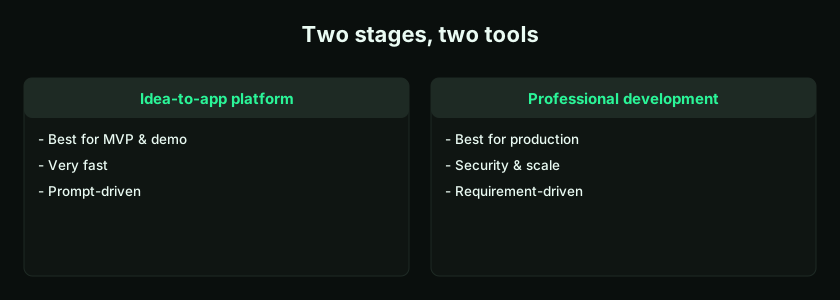
Idea-to-app platforms let you turn a plain-English idea into a working app in minutes. Professionally developed applications go deeper — requirement analysis, architecture, security, testing, and production readiness. Both use AI. The real difference is who guides the AI and how well they understand the requirement.
A Genuine Shift — With One Important Caveat
Today a user can describe an idea in simple language and generate an app screen, dashboard, workflow, admin panel, or MVP in a short time. Earlier, software development required long discussions, technical teams, wireframes, coding, testing, and multiple review cycles before the first usable version appeared. Platforms like LogicMint compress that dramatically.
But every user should understand one reality: an idea-to-app platform and a professionally developed application are not the same thing. Both are useful, both can use AI, and both can use agentic development tools. The outcome, though, depends heavily on requirement understanding, architecture decisions, business context, testing, security, and production readiness. AI generates quickly; professionals understand real-world requirements more deeply because they ask questions, identify risks, handle exceptions, and design for practical use.
What Is an Idea-to-App Platform?
An idea-to-app platform converts a business idea, workflow, or product concept into an application using AI prompts. Say "Create a booking app where customers select a service, choose a date and time, enter contact details, and submit a request," and it generates a booking form, service selection, a calendar layout, customer fields, an admin booking list, and a basic dashboard. This is extremely useful for MVPs, prototypes, and early-stage apps: founders validate concepts, business users explain workflows, freelancers create demos, and teams cut the time to a first version. That is the strength of these platforms — they make app creation faster and more accessible. (New to the category? Start with what an AI app builder is.)
What Is a Professionally Developed Application?
Professional development follows a more detailed process: requirement discovery, business-process understanding, user-journey mapping, architecture planning, database design, UI/UX design, security planning, backend and frontend development, API integration, testing, deployment, monitoring, documentation, and maintenance. It is not just writing code — it is understanding the real problem and building a reliable system around it.
Building an expense-approval app, for instance, is not only a form and an approve button. A professional asks: Who can submit? Who approves? Is there a second-level approval? What happens above a limit? Which expenses are taxable? Is a receipt mandatory? Should data flow to accounting software? Who can edit after approval? Is audit history required? What if an approver is absent? AI may generate the first version, but professional requirement analysis makes the application practical.
Both Platforms and Professionals Use Agentic Tools
There's a common misconception that AI platforms and professional developers are entirely separate. They're not. Modern professionals also use agentic tools — for code generation, UI suggestions, test cases, documentation, debugging, refactoring, API planning, architecture exploration, data-model suggestions, deployment scripts, and performance review. So the difference is not "AI platform vs human developer." It is who is guiding the AI, and how well they understand the requirement.
A non-technical user might say "Build an HR app." A professional might say: "Build an employee leave-management module with role-based approvals, leave-balance calculation, carry-forward rules, holiday-calendar integration, manager escalation, audit logs, and monthly payroll export." Both use AI — but the professional's instruction is better because they understand the business process, so the output is better. (This mirrors the small-prompt discipline in how to prompt LogicMint.)
Machines Generate Based on Instructions
AI does not automatically know your business. It doesn't know your company policies, approval matrix, tax logic, customer expectations, internal exceptions, compliance requirements, or scaling plans unless you explain them. It works from the instructions provided: generic instructions produce generic output; detailed instructions produce better output. A machine can generate screens; a professional can design workflows. A machine follows instructions; a professional can ask whether the instruction is even correct. That difference matters.
Why Professional Requirement Understanding Is More Efficient
A developer, consultant, product manager, or business analyst brings experience. They've seen similar systems, know what usually goes wrong, know which questions to ask, and know what users forget to mention. Ask for "user roles" and a professional will probe: How many roles? Can one user have several? Are permissions customizable? Who creates users? Can users be deactivated? Can managers see team data? Should access be logged? Should permissions be module-wise? Should role changes require approval? That depth of requirement gathering makes development more efficient and less risky — and it's exactly what AI won't do unless guided.
Idea-to-App Platforms Are Excellent for MVPs
These platforms shine when you want to test an idea quickly — MVPs, prototypes, demos, internal workflow drafts, client presentations, startup validation, feature exploration, and early user feedback. For a customer-complaint app, LogicMint can quickly generate a complaint form, complaint list, status tracker, admin dashboard, assigned-person field, priority labels, and basic reports. That's enough to test the workflow: users see it, stakeholders comment, the founder validates, and the team decides what's missing. This is the correct use — reducing the time from imagination to first version. The reliable way to build it is one module at a time, as in building with small prompts.
Professionally Developed Apps Are Needed for Production
When an app serves real users, customers, employees, vendors, or paying subscribers, the standards change. A production-ready app must be secure, stable, scalable, tested, maintainable, documented, properly deployed, monitored, backed up, and compliant where required. A production CRM, for example, must handle authentication, role-based access, data privacy, lead assignment, duplicate detection, email integration, performance at scale, audit trails, exports, backups, reporting accuracy, admin controls, and API security. That's deeper than an MVP. The MVP proves the idea; professional development prepares it for real usage. Our guides on production readiness and prototype to production go further.
Idea-to-App Platform vs Professional Development
| Area | Idea-to-app platform | Professional development |
|---|---|---|
| Best use | MVP, prototype, demo | Production-ready application |
| Speed | Very fast | Slower but deeper |
| Cost | Lower for early stage | Higher but more reliable |
| Requirement depth | Depends on user prompt | Professionally analyzed |
| Security | Basic unless specified | Designed and reviewed |
| Scalability | Limited unless planned | Planned from architecture |
| Testing | Basic | Structured QA and regression |
| Business logic | Prompt-driven | Requirement-driven |
| Production readiness | Not automatic | Built intentionally |
| Human judgment | User-guided | Expert-guided |
Both have value. The mistake is using one for the wrong purpose: use idea-to-app platforms for speed and validation, and professional development for reliability and production. This is closely related to choosing between AI app builder vs no-code vs code.
Example: School App
A school owner can use LogicMint for a homework-tracking MVP — teacher homework creation, a parent dashboard, homework status, and due-date reminders — great for testing. A production school app, though, may need a student database, class/section mapping, teacher assignments, parent-child mapping, role-based access, notifications, attendance integration, exam and fee modules, data privacy, a mobile app, admin reports, and backups. The MVP is generated quickly; the full platform needs professional planning.
Example: Finance App
A finance team can create an expense-approval MVP — expense form, receipt upload, manager approval, status dashboard. A production finance app may require an approval hierarchy, budget checks, tax categories, ERP integration, audit logs, maker-checker controls, role-based restrictions, document retention, export to accounting systems, exception handling, month-end close support, and compliance review. That's not just a form — it's a financial-control system, where professional understanding is critical.
Example: E-Commerce App
An idea-to-app platform can generate an e-commerce prototype — product listing, cart, checkout, order list, admin product page — good for a demo. A commercial store needs secure payments, tax calculation, inventory control, shipping integration, refund handling, order emails, customer-data protection, fraud prevention, performance optimization, mobile responsiveness, legal policies, analytics, and support. A demo store and a real online business are not the same; production e-commerce needs professional implementation. See building an e-commerce store with AI.
Why Non-Technical Users Should Still Use These Platforms
None of this means non-technical users should avoid AI app builders — they absolutely should use them. Idea-to-app platforms help non-technical users convert ideas into visible products, understand what they actually need, show demos to stakeholders, reduce early-stage dependency, validate workflows, prepare better requirements, cut development cost, and communicate more clearly with professionals. Arriving at a developer with a working LogicMint MVP, rather than a vague idea, turns the MVP into a communication bridge that shows exactly what you want. (More in agentic platforms for non-technical users.)
Why Professional Teams Should Use Them Too
Professional teams can also use LogicMint — for requirement visualization, rapid prototyping, client demos, workflow validation, UI exploration, internal tools, early MVPs, and faster iteration. A professional using LogicMint moves faster than one starting from a blank screen. The best future isn't AI alone or humans alone; it's professionals using AI properly.
The Real Difference Is Judgment
The biggest difference between an AI-generated app and a professionally developed one is judgment. Professional judgment answers: Is this the right workflow? Is it secure enough? Will it scale? What happens if data is wrong or users misuse it? What should be logged, restricted, automated, or kept manual? What happens during failure? What does compliance require? What will this look like in six months? AI helps generate options; professionals evaluate the right option. That's why human expertise still matters.
When to Use Self-Service — and When to Bring in Experts
Use LogicMint self-service to test an idea, create an MVP, build a demo, explore workflows, create a client prototype, draft an internal tool, validate a startup concept, or generate a first version quickly — the fast path that helps you learn before spending heavily. Bring in LogicMint Professional Services or another qualified team when you want to launch commercially, use the app internally with real users, store sensitive or customer data, collect payments, integrate with ERP/CRM, scale to many users, build a SaaS product, add advanced security, deploy on cloud, prepare mobile apps, maintain long-term, or meet compliance requirements. At that stage professional support isn't an expense — it's protection for your users, data, business, and brand.
Key takeaways
- Idea-to-app platforms are ideal for MVPs and validation; professional development is for production reliability.
- Both use agentic tools — the real difference is the quality of direction guiding the AI.
- Machines generate from instructions; professionals interpret requirements, ask the right questions, and design for edge cases.
- Non-technical users and professional teams both benefit — the best results come from professionals using AI well.
- Use LogicMint to build fast; use professional expertise to build right.
Frequently Asked Questions
Are idea-to-app platforms better than professional developers?
They serve different purposes. Idea-to-app platforms are excellent for MVPs and prototypes. Professional developers are better for production-ready applications that need security, scalability, and deep customization.
Can professionals also use agentic development tools?
Yes. Many professional developers and consultants use AI and agentic tools to improve productivity, generate code, test faster, and explore solutions.
Why is professional requirement understanding important?
Professionals understand business processes, edge cases, security risks, compliance needs, and practical user behavior. This helps them guide AI tools more effectively.
Can I use LogicMint to build a commercial app?
You can use LogicMint to create an MVP and test your idea. Before commercial launch, the app should be professionally reviewed, secured, tested, and deployed.
What is the main difference between an MVP and a production app?
An MVP tests the idea. A production app runs the real business. Production apps need security, testing, monitoring, scalability, backup, and maintenance.
Should non-technical users use idea-to-app platforms?
Yes. Non-technical users can use idea-to-app platforms to visualize ideas, create MVPs, validate workflows, and communicate better with development teams.
Idea-to-app platforms are powerful: they move users from idea to MVP faster than ever, reduce early-stage cost, and make software creation accessible. But they don't remove the need for professional understanding — requirement analysis, architecture, security, testing, deployment, and long-term support. Both platforms and professionals use agentic tools; the difference is the quality of direction. Use LogicMint to build fast, use professional expertise to build right, and use both together to create better applications. Start from LogicMint or compare plans on pricing.